

Deploy a sample application
To play with Istio and demonstrate some of it's capabilities, you will deploy the example BookInfo application, which is included the Istio package.
What is the Bookinfo Application
This application is a polyglot composition of microservices are written in different languages and sample BookInfo application displays information about a book, similar to a single catalog entry of an online book store. Displayed on the page is a description of the book, book details (ISBN, number of pages, and so on), and a few book reviews.
The end-to-end architecture of the application is shown in the figure.
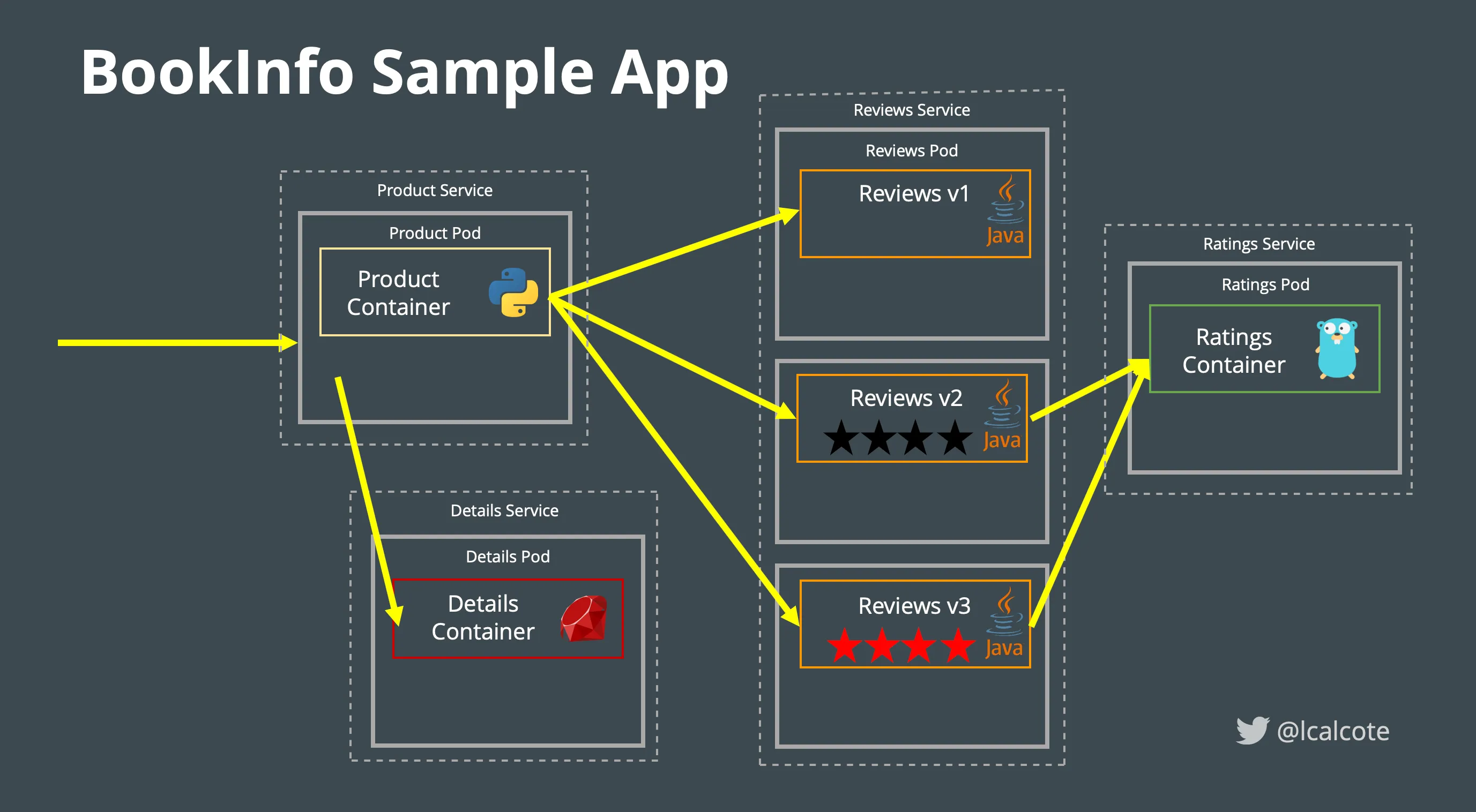
Figure: BookInfo deployed off the mesh
It’s worth noting that these services have no dependencies on Istio, but make an interesting service mesh example, particularly because of the multitude of services, languages and versions for the reviews service.
As shown in the figure below, proxies are sidecarred to each of the application containers.

Figure: BookInfo deployed on the mesh
Sidecars proxy can be either manually or automatically injected into the pods. Automatic
sidecar injection requires that your Kubernetes api-server supports admissionregistration.k8s.io/v1
or admissionregistration.k8s.io/v1beta1 or admissionregistration.k8s.io/v1beta2
APIs. Verify whether your Kubernetes deployment supports these APIs by executing:
If your environment does NOT supports either of these two APIs, then you may use manual sidecar injection to deploy the sample app.
As part of Istio deployment in Previous chapter, you have deployed the sidecar injector.
Deploying Sample App with Automatic sidecar injection
Istio, deployed as part of this workshop, will also deploy the sidecar injector. Let us now verify sidecar injector deployment.
Output:
NamespaceSelector decides whether to run the webhook on an object based on whether the namespace for that object matches the selector.
Output:
Using Meshery, navigate to the Istio management page.
- Enter
defaultin theNamespacefield. - Click the (+) icon on the
Sample Applicationcard and selectBookInfo Applicationfrom the list.
This will do 3 things:
- Label
defaultnamespace for sidecar injection. - Deploys all the BookInfo services in the
defaultnamespace. - Deploys the virtual service and gateway needed to expose the BookInfo's productpage application in the
defaultnamespace.
- Verify that the deployments are all in a state of AVAILABLE before continuing.
- Choose a service, for instance
productpage, and view it's container configuration:
- Examine details of the services:
Next, you will expose the BookInfo application to be accessed external from the cluster.
Alternative: Manual installation
Follow this if the above steps did not work for youLabel namespace for injection
Label the default namespace with istio-injection=enabled
Output:
Deploy BookInfo
Applying this yaml file included in the Istio package you collected in Getting Started will deploy the BookInfo app in you cluster.
Deploy Gateway and Virtual Service for BookInfo app
Manual Sidecar Injection
Use this only when Automatic Sidecar injection doesn't work
To do a manual sidecar injection we will be using istioctl command:
Observing the new yaml file reveals that additional container Istio Proxy has been added to the Pods with necessary configurations:
We need to now deploy the new yaml using kubectl
To do both in a single command:
Now continue to Verify Bookinfo deployment.


